|
|
Index Project |
|
|
Index Project |
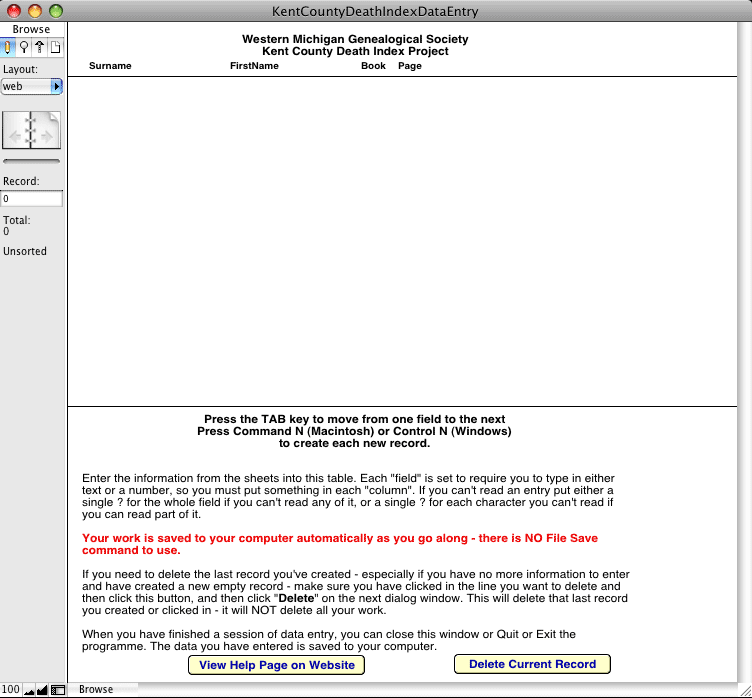
This page is an information page for those helping in the transcription of the Kent County Death Index records. For this project we are using a "stand alone" database prepared in FileMaker Pro for the data input. It is hoped that this will help with more consistent data entry, making checking and compiling easier. The screen you will use is shown below.The software for both Macintosh Mac OS X 10.3 and higher, and Windows 98/2000/XP/Vista users can be downloaded from the links below.
In both cases the download is a self extracting archive that can be expanded on your computer without the use of any other software. When the file has been downloaded double click it to expand it. Once installed, you will end up with a folder called KentCountyDeathIndex on your computer.
Windows Users
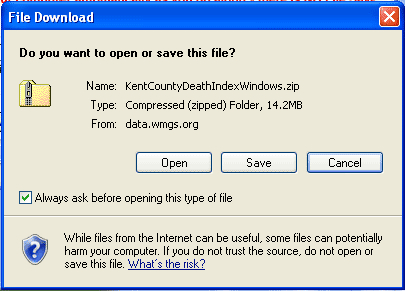
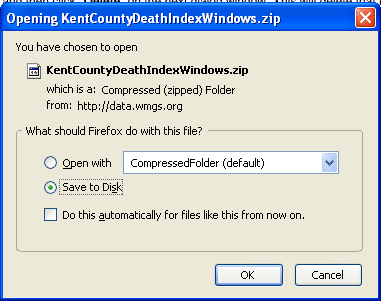
These screen shots might help Windows users with this process. After you click the link to download the file you might see a window like one of these...
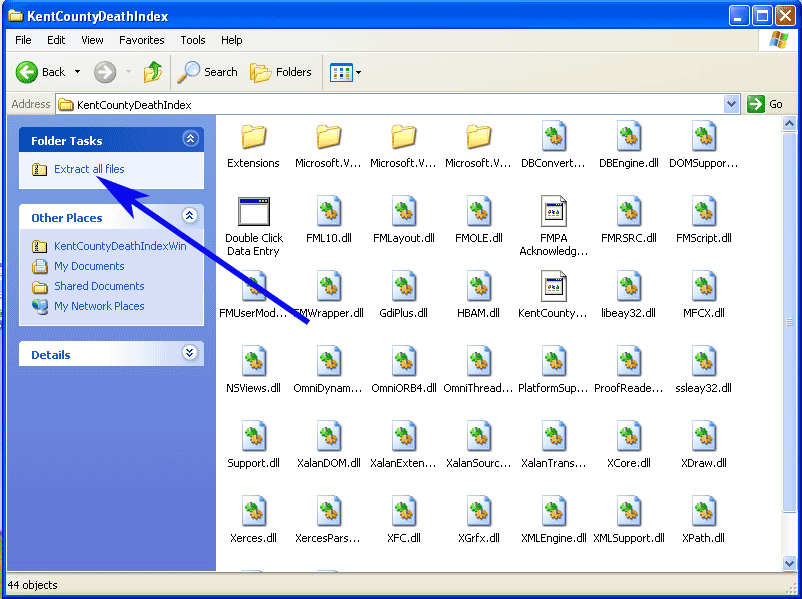
Once the download has completed, find the file where you saved it to, or where your downloads are normally saved to, and double click the file KentCountyDeathIndexWindows.zip. This should open a window similar to this one
and once open click the link for "Extract All Files". This will open the Wizard which will walk you through extracting and saving the files. Make sure you know where you are extracting the files to, so you can get back to it. The Desktop is probably a good place.
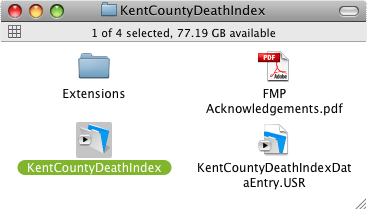
Macintosh users will see
To open the database ready for data entry double click the file that is highlighted in the screen shot above. The screen shown below will appear.
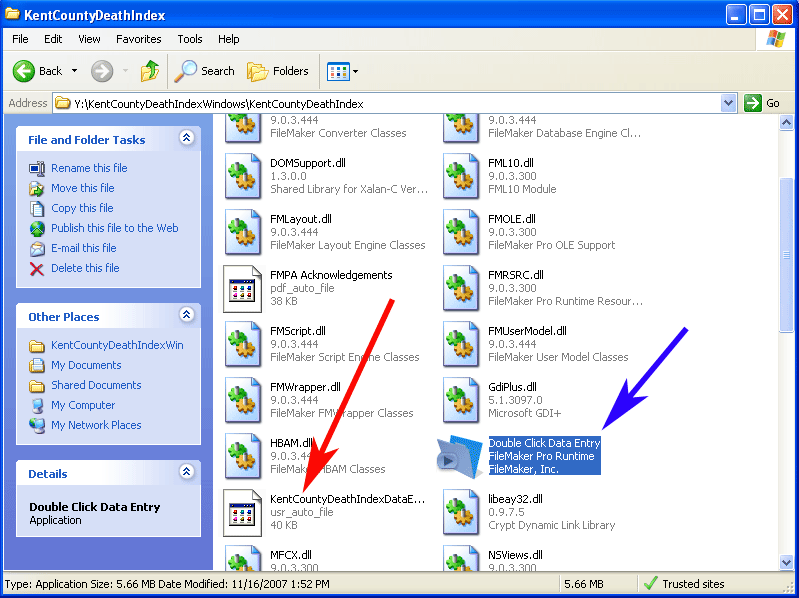
Windows users will see
To open the database ready for data entry, double click the file called "Double Click Data Entry" - the file shown with the blue arrow above . If you double click the file called KentCountyDeathIndexDataEntry, you will get a dialog asking you to choose a program to associate with .usr files, and once "Double Click Data Entry" is chosen, future database projects will also try to run in this, which won't necessarily be correct.
For both Macintosh and Windows users, the data you enter is stored in the file called "KentCountyDeathIndexDataEntry". This is the file that must be returned to me (preferably by eMail) when you are done transcribing.
NOTE!!!!!! do NOT send me the file called "KentCountyDeathIndex.zip". This is NOT the file with the data in it, but is the file you originally downloaded that expanded to the above window. The file with the data in it is "KentCountyDeathIndexDataEntry" (or "KentCountyDeathIndexDataEntry.USR" if your computer is set to show the extension on the name) from inside the folder shown above. (See above screen shot).Data Entry Screen
The Windows screen is similar to this, the only difference being that the last bolded line says "Press Control N to enter the next record."
There are 4 fields for data for each person, and they appear in the database in the order that you see them on the page - Last Name, First Name, Book, Page.
Note the instructions on the screen.
- To get started when you first open the file, you need to press Command N (Control N on a Windows computer) to create the first empty record.
- Each field is set to require something to be entered into it. If you can't read the entry, put ???? in the space.
- When you have entered the information for the first person, press Command N (Control N on a Windows computer) to create the next empty record.
- Repeat until done.
- At the end, do not create a new empty record, or you will be unable to close the file. If this does happen, click on that last empty record and then click the button called "Delete Current Record" to delete the empty record you've created.

Use the appropriate link here to download the file:
Macintosh users Click Here
Windows users Click Here
If you have any questions about the data entry aspects of this, please contact me by eMail